ButterPOS
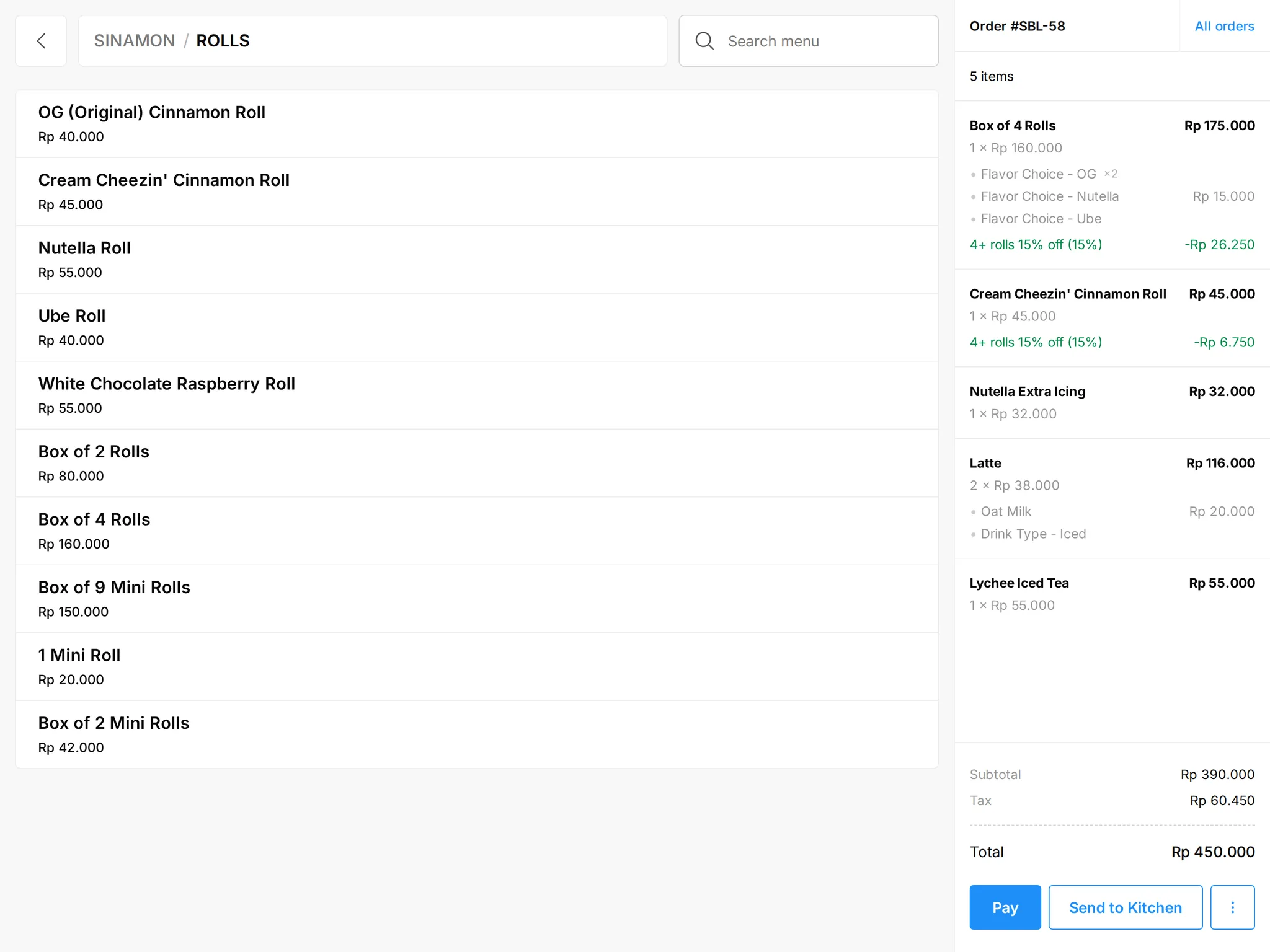
A point of sale that takes every order on one screen
Dine-in, takeaway, GrabFood, GoFood and your own online store land in the same queue — printed in the kitchen straight away, and recorded in stock and reporting as they happen.
- iPad & Android (including iMin)
- QRIS, BCA & BRI card terminals, split bills
- Customer display with QRIS
What goes away when your POS is connected
A row of delivery tablets at the counter
No more retyping GrabFood and GoFood orders from separate tablets. They arrive in ButterPOS and print automatically.
Cash that never matches at close
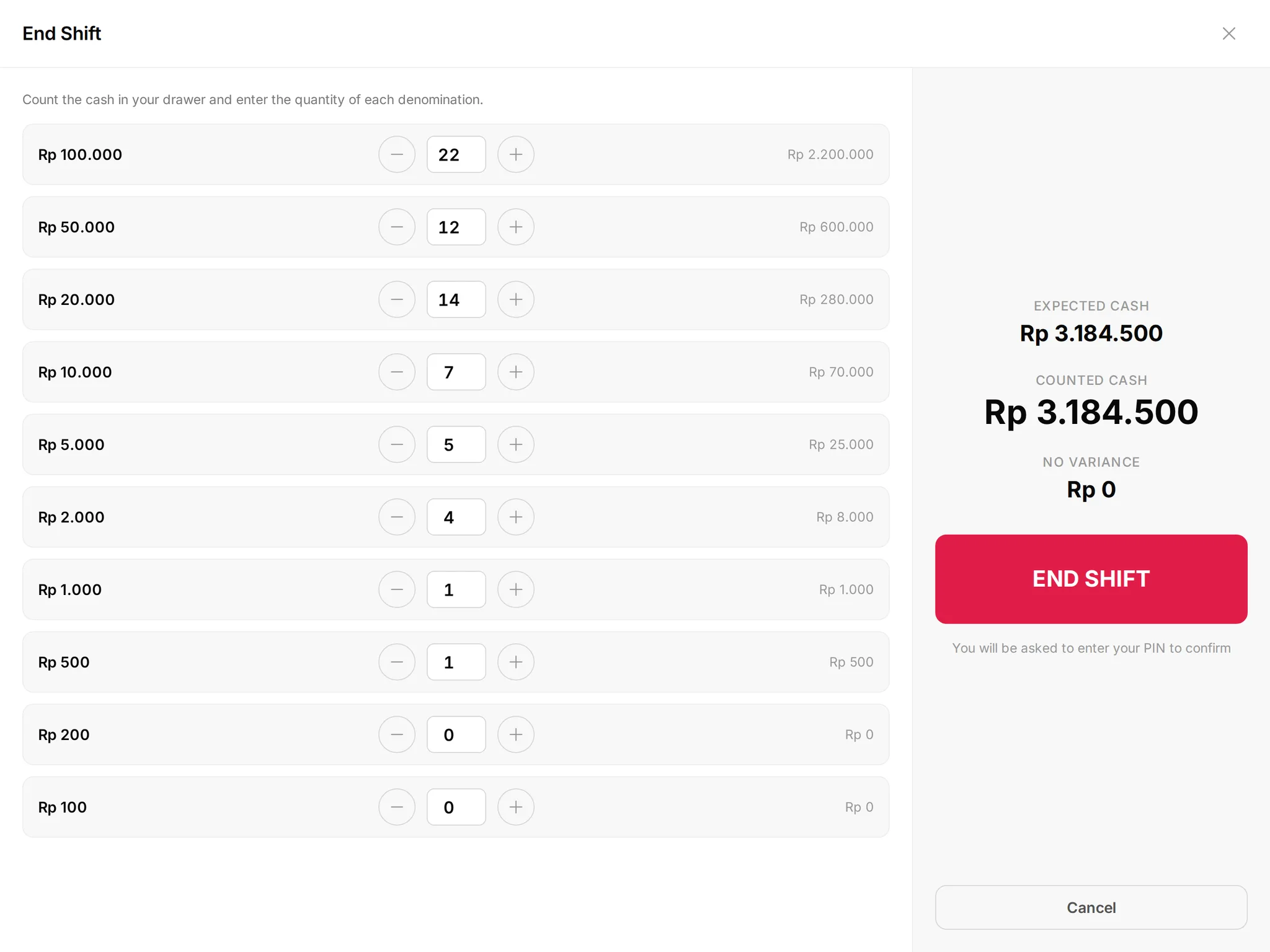
Every shift opens and closes with an employee PIN. Cash collected is calculated from cash payments minus refunds, not from memory.
Stock and reports that always lag
Each sale deducts stock by recipe and flows into Mastermind as it happens. No month-end spreadsheet reconciliation.
One order queue
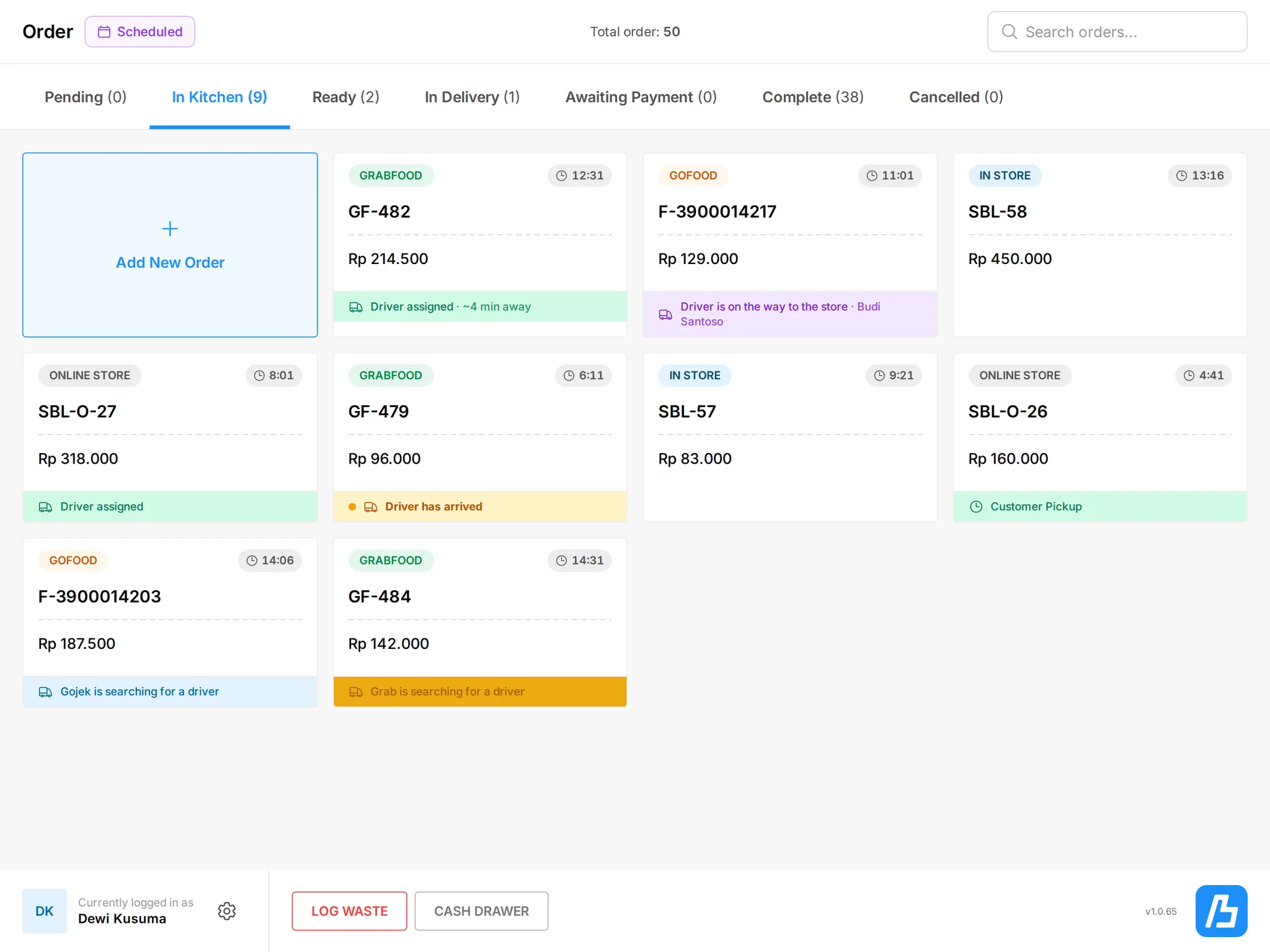
GrabFood, GoFood and online orders in the same register
Orders from every channel arrive in real time with a sound alert and banner — even when the iPad is locked or the app is in the background.
- Receipts and kitchen tickets print automatically on arrival
- Scheduled-order queue with a timer on every order
- Book a courier and track the driver from the register
- Pause sales channels and mark items sold out from the POS
Payments
Take QRIS, cards and cash without counting twice
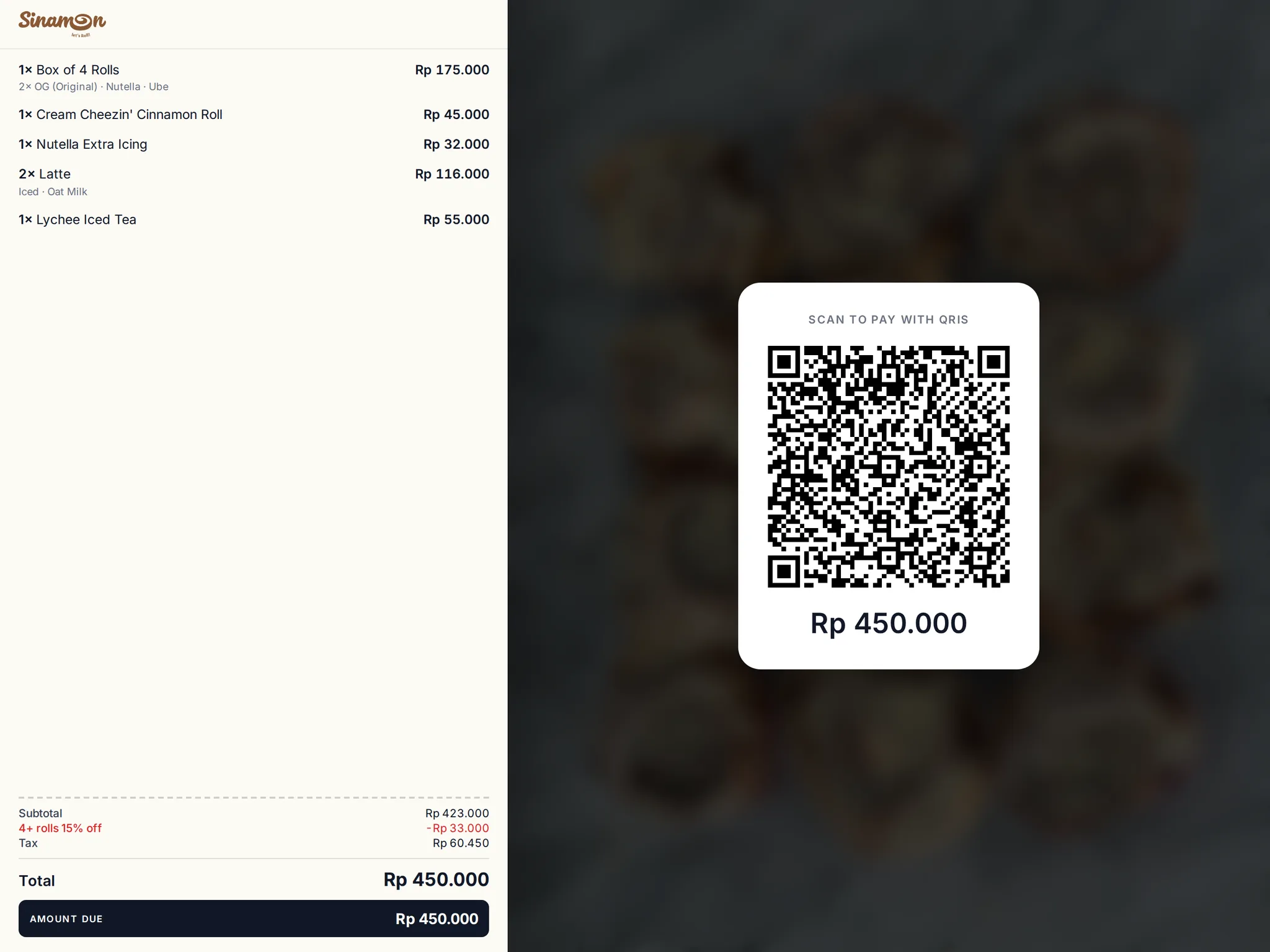
Customers pay however they like and your team never recounts. Cash rounding to Rp100 and split bills are built in.
- QRIS plus BCA and BRI card terminals connected to the register
- Split one bill across several payment methods
- Discounts, adjustments and refunds with a clear trail
- A customer-facing display shows the order and total live
Shifts & staff
Clean shifts, from opening to the bank deposit
Staff sign in with a PIN, the register locks when left alone, and the daily report is PIN-protected. Every closed shift’s cash becomes an invoice in Xero.
- Open and close shifts with an employee PIN
- PIN-gated daily report
- Cash deposits prepared and recorded from the Manager app
- Any deposit difference needs a reason and an approval
Manager app
Stock, receiving and production from a phone
The Manager app for iOS and Android handles the work behind the counter: receive purchase orders, count stock, log waste and print production labels.
- Receive goods with bill photos and a receiver PIN
- Full or per-shift stock counts
- Production runs: scale the recipe, weigh, label with a QR code, scan
- Print labels on Zebra printers, with OHAUS scale support
Everything a modern register needs
Built for the pace of F&B and retail in Indonesia.
iPad & Android
Runs on iPad and Android, including iMin terminals. Touch-first, with dark mode and haptics.
Epson auto-discovery
Epson network printers are found automatically, and every print attempt is logged for troubleshooting.
QRIS & card terminals
QRIS, BCA and BRI card terminals, cash, other methods and split bills in one payment flow.
Rain mode
One tap flags the outlet as rained-on for an hour — every device and manager is notified at once.
Driver tracking
Book a courier from the register and follow the driver’s position as it updates.
Staff PINs
PIN sign-in, a lock screen and role-based permissions for every employee.
Receipts & kitchen tickets
Customer receipts and kitchen tickets print automatically; the cash drawer opens through the receipt printer.
Barcode scanning
Scan barcodes to find products fast, and log waste with a reason.
Butter AI
AI around your register
The register stays simple for the team on the floor. AI works behind it — setting up menus, checking supplier bills and answering questions about your sales.
AI menu import
Upload a price list as a PDF or spreadsheet and AI turns it into menu items, modifiers and categories in Butter.
Receiving bill check
Photos of supplier bills taken when goods arrive are read by AI and checked against the purchase order.
Ask Mastermind
Ask “when did coffee sell best this week?” and get an answer from your POS data.
Works with



- BCA card terminals
- BRI card terminals
- Epson printers
- Zebra printers
- OHAUS scales


Works with the rest of Butter
One set of customers, menu and stock across every product — no exports, no extra integrations.
ButterStore
Your own online store — you own the whole customer experience
Kopi Susu Aren
Rp 28,000
Croissant Almond
Rp 35,000
Mastermind
Sales, margin and customer analytics — ask in plain language
Gross margin · 30 days
64,2%
ButterCX
WhatsApp, Instagram & Messenger in one AI-assisted inbox
Where is my order ON-1042?
Replied by AIOut with GoSend, about 12 minutes away.
ButterPOS questions
What hardware do I need?
ButterPOS runs on iPad and Android devices, including iMin POS terminals. For receipts and kitchen tickets we support Epson network printers.
Do GrabFood and GoFood orders go straight to the register?
Yes. GrabFood, GoFood and your online store orders arrive in the same ButterPOS queue, with alerts and automatic printing.
Do you charge per device?
No. Butter is priced per outlet, with unlimited devices and staff. See the pricing page for details.
What happens if the internet drops?
ButterPOS needs an internet connection. When the connection is lost, the register shows a clear warning so your team knows right away.
See Butter run your business
A 30-minute demo with our team. We walk through the POS, online orders and reporting using your own menu.
Free, no commitment. We reply on WhatsApp within one business day.