ButterSupply
From purchase order to the cost of every item, in one flow
Order from suppliers or your own warehouse, receive on a phone, and let every sale deduct stock by recipe. Purchase prices, stock at every outlet and COGS always come from the same numbers.
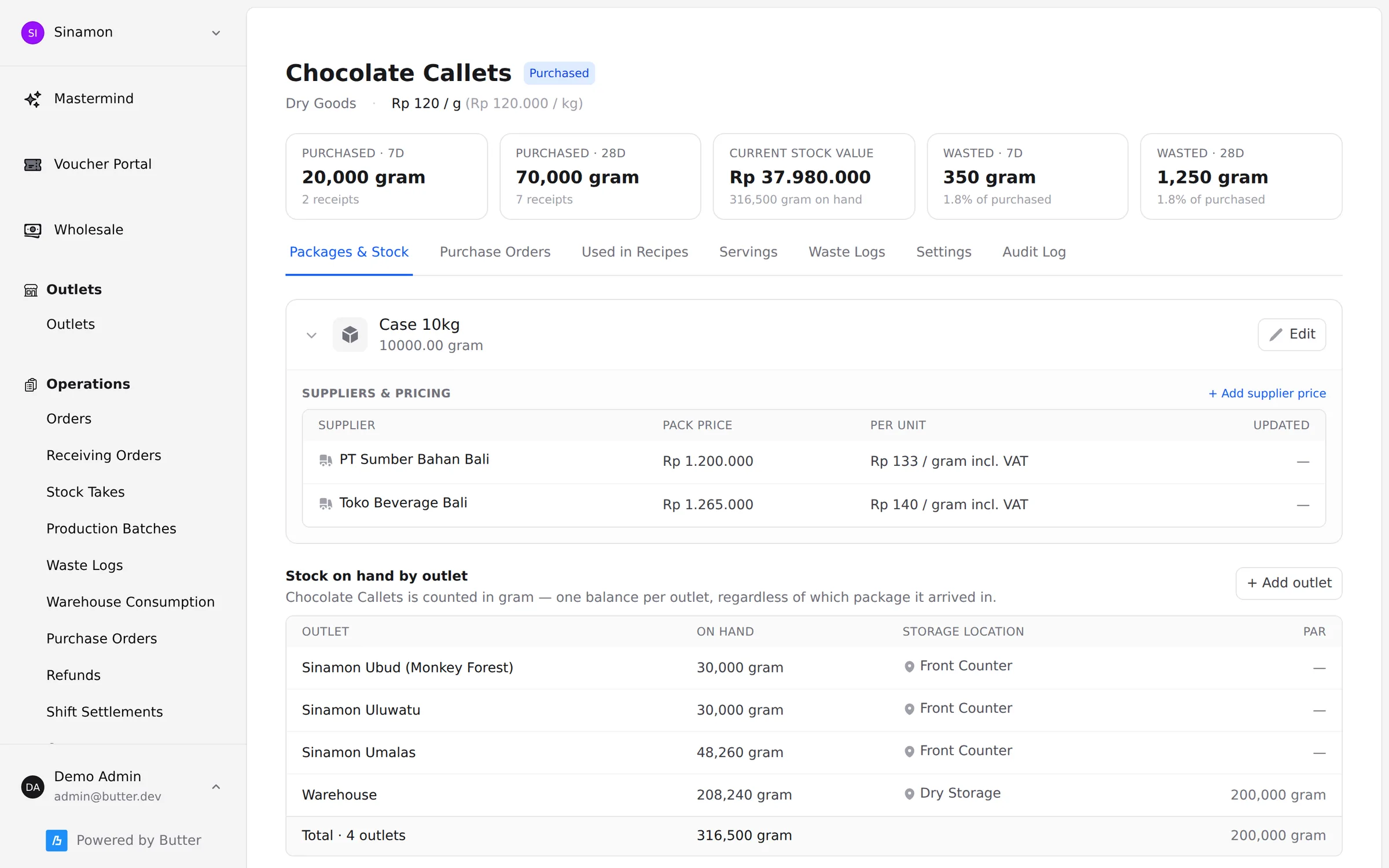
- Stock per outlet and per storage location
- Supplier bills checked by AI against the PO
- COGS per item, on every sales channel
What disappears when purchasing, stock and COGS share one system
Supplier bills nobody checks
The bill is photographed when goods arrive, and AI matches every line’s quantity and price against the PO before you approve it.
COGS from last year’s spreadsheet
Supplier prices flow into recipes and on to every item you sell, so COGS follows the latest price — not a guess made when the menu was written.
Stock in the system never matches the shelf
Sales, receiving, production, transfers, waste and stock counts all land in one ledger per item, per outlet.
Purchasing & transfers
Order from suppliers, or from your own warehouse
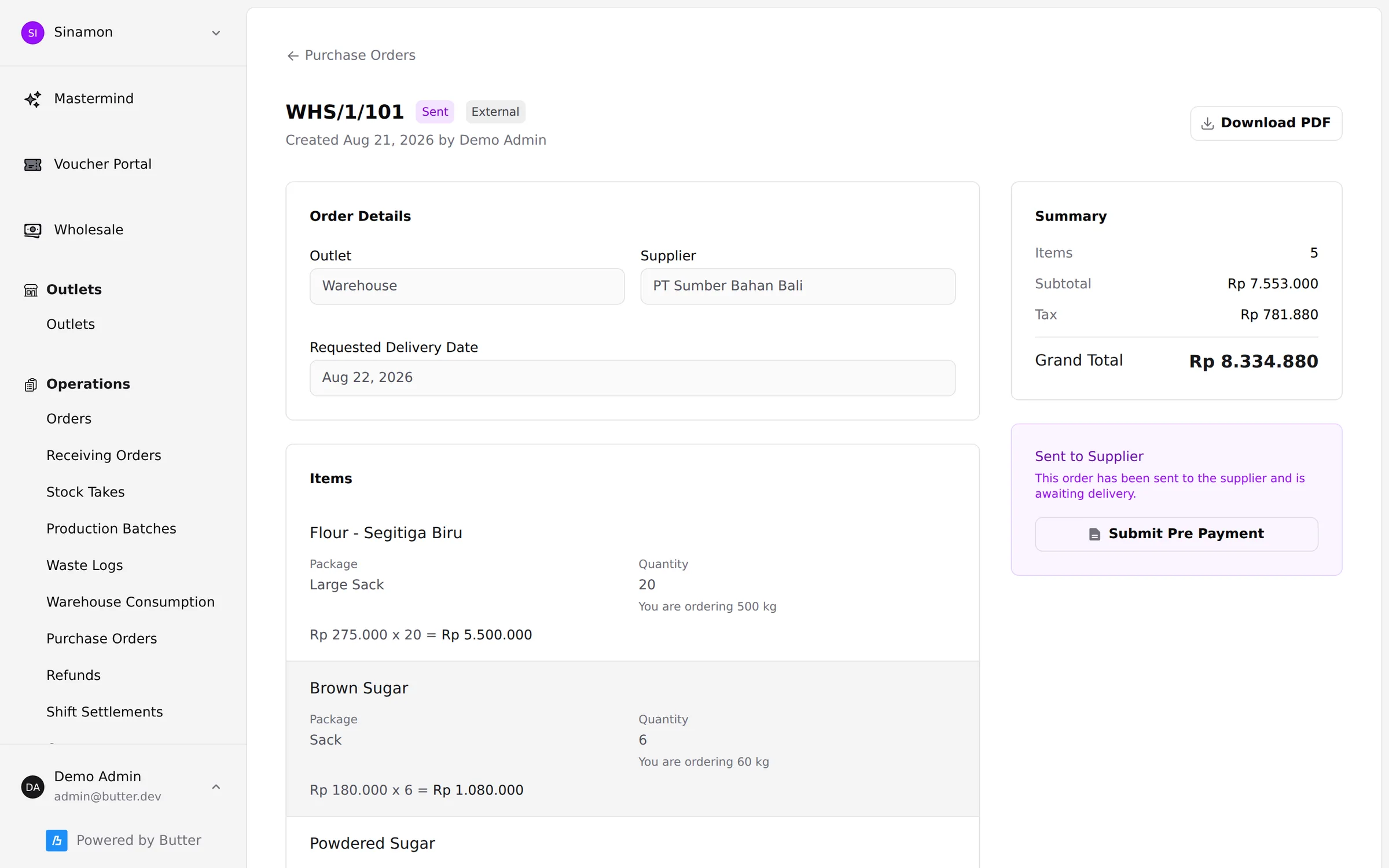
Create purchase orders per outlet with agreed packs and prices. Outlets ordering from a warehouse or central kitchen use the same flow, and the warehouse prepares the order in the Manager app.
- Per-pack prices from several suppliers, VAT included
- Optional approval before a PO goes out, and a PDF to send
- Scan-based pick & pack at the warehouse, then a printed delivery note
- Transfers between outlets recorded as stock movements
Receiving
Receive on a phone, approve with the bill beside you
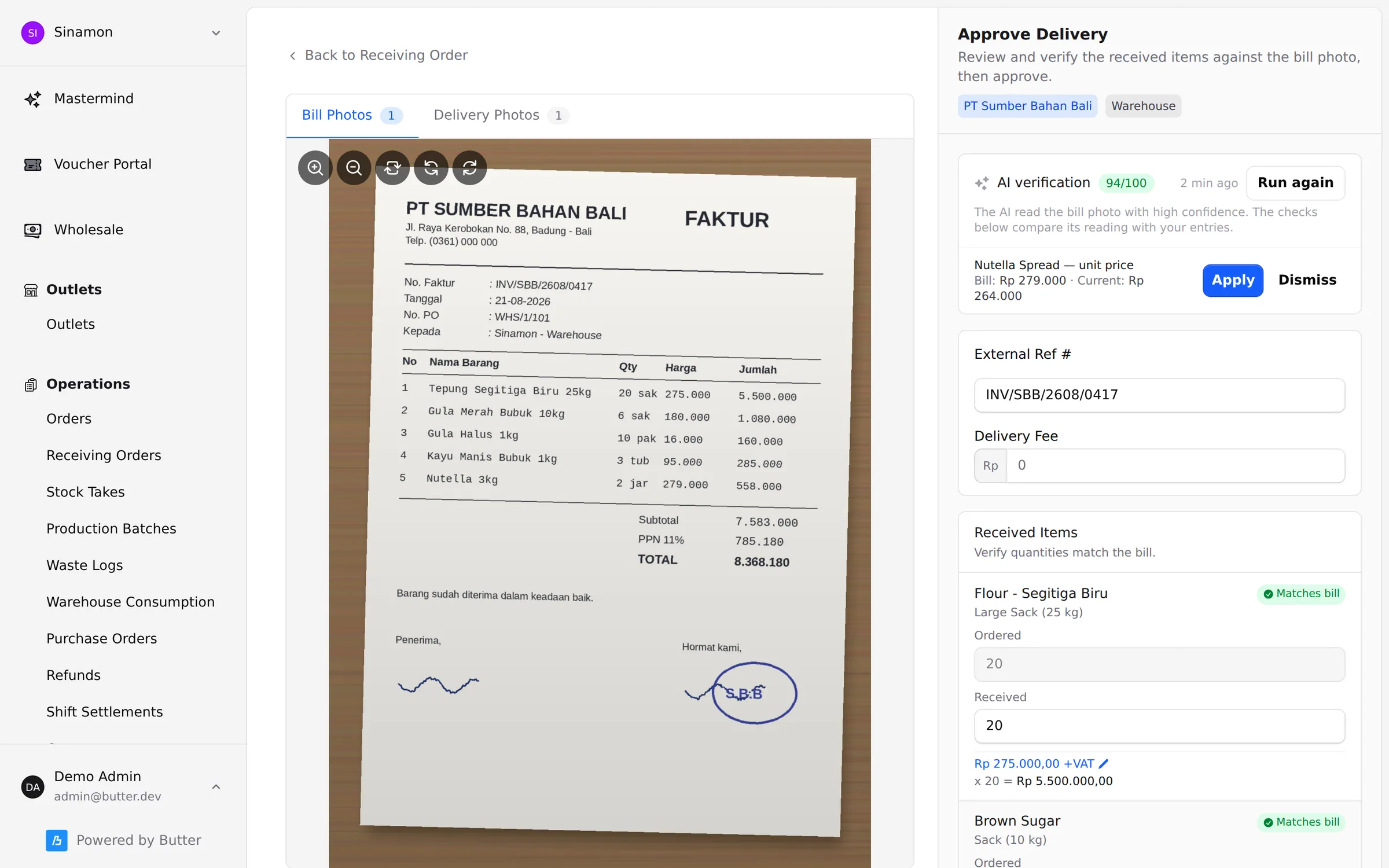
Staff receive goods in the Manager app: scan labels or barcodes, enter what arrived, photograph the bill and the goods, and confirm with a PIN. In the backoffice the bill sits next to the form — with AI already flagging what matches.
- AI reads the bill photo and matches quantities and prices to the PO
- A changed price can be applied in one click
- Warehouse deliveries are received against what was actually packed
- Approved receipts become draft bills for ButterPay and Xero
Recipes & sub-recipes
Recipes that know the price of every gram
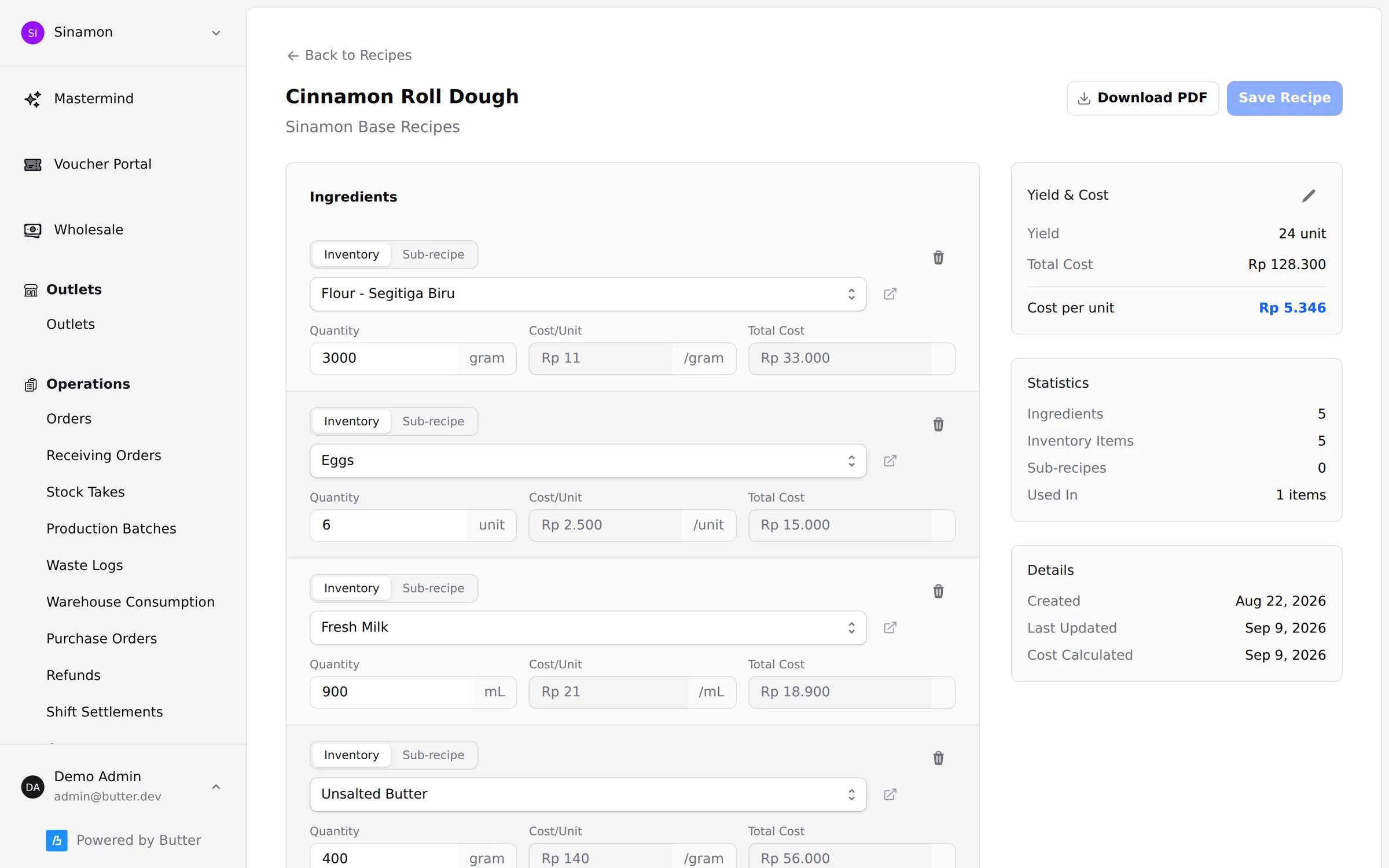
Build recipes from inventory items or sub-recipes, with a batch yield in the units your kitchen uses. Line costs, batch totals and the cost per portion come from the latest purchase prices.
- Sub-recipes for doughs, sauces, fillings and bases
- Named servings ("1 × portion") so recipes are quick to build
- Optional approval for new recipes and items before they are used
- Print any recipe as a PDF for the kitchen
COGS per item
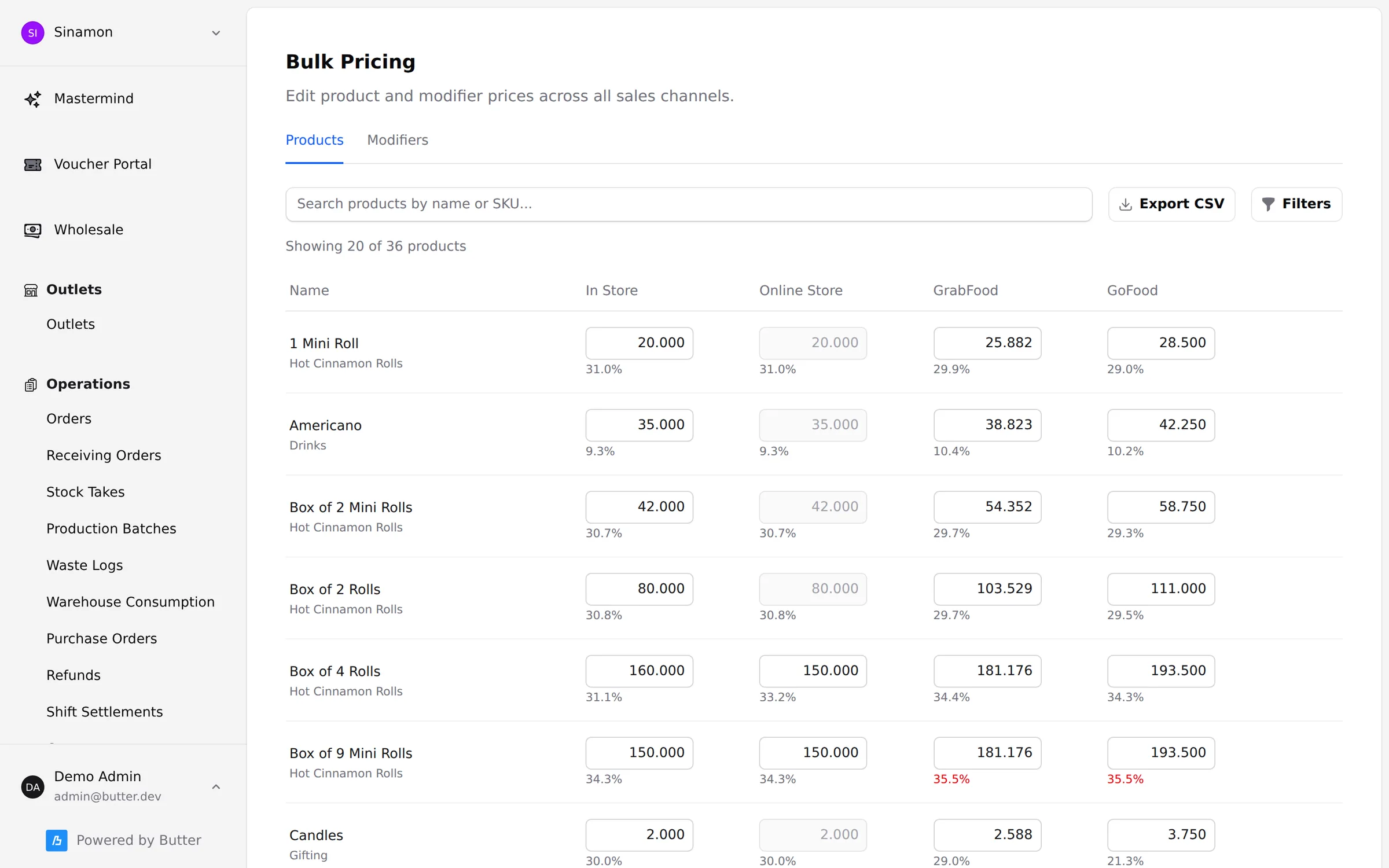
See food cost on every channel, after delivery-app commission
Every product links to a recipe or straight to an inventory item, modifiers and bundles included. The pricing page shows food cost in store, online, on GrabFood and on GoFood — anything above 35% turns red.
- Retail products can deduct a single item, no recipe needed
- Modifiers and bundle choices deduct stock too
- GrabFood and GoFood food cost is worked out after commission
- The COGS of every order feeds the margin reports in Mastermind
Central-kitchen production
Production that weighs, labels and records itself
In the Manager app the central-kitchen team picks an item and the recipe scales to the amount being made. Ingredients are weighed on an OHAUS scale, QR labels print on a Zebra printer, and the output only enters stock when its labels are scanned.
- Scale a recipe by batch, by pack or from a single ingredient
- Record the ingredients used when they differ from the recipe
- Labels carry the weight, production date and expiry date
- Recipe sheets print on an Epson receipt printer
Stock counts & waste
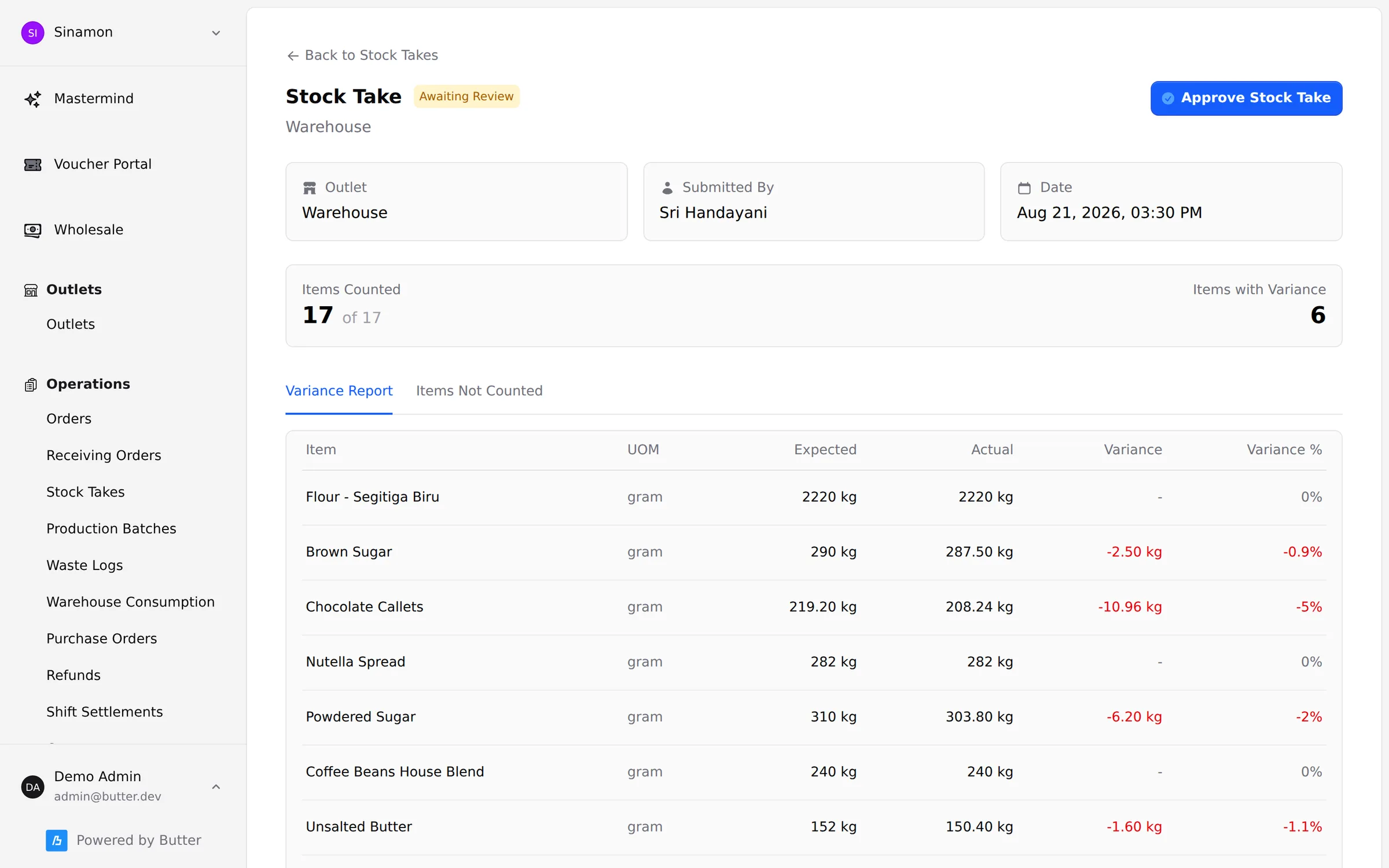
Count by scanning, approve the variance in the backoffice
Staff count by storage location — chiller, dry store, front counter — by scanning or tapping in the Manager app, for a full stock take or a quick count each shift. The backoffice shows the variance per item before you approve it.
- Full stock takes or per-shift counts
- Variance reports in units and percent
- Waste logged against reasons you define
- The history of every stock movement, per item and outlet
For restaurants, central kitchens and retail stores
The same flow for coffee and pastry, kitchen ingredients, or finished goods on a store shelf.
Packs & units
Buy by the sack or case, count by the gram or piece. Stock always lives in one unit per item.
Suppliers & prices
Several suppliers per pack, with VAT and price history.
Outlets & warehouses
Stock per outlet and per storage location, with par levels.
Scan anywhere
A phone camera or a dedicated scanner, for receiving, counting and picking.
QR Zebra labels
Production labels, and weigh-and-print labels for goods sold by weight.
Automatic COGS
Recipe costs recalculate from purchase prices, down to every product and modifier.
Approvals
POs, receipts, new items, recipes and stock takes can all require sign-off.
Inventory ledger
Sales, receiving, production, transfers, waste and counts — every movement recorded.
Into ButterPay & Xero
Approved receipts become supplier bills, ready to pay and book.
Butter AI
AI in ButterSupply
AI works on the step most teams skip: comparing the supplier’s bill with what you actually ordered.
Bill check against the PO
AI reads the bill photo, matches every line to the received items, and shows quantity or price differences as suggestions you can apply or dismiss.
Photos that straighten themselves
Sideways or upside-down bill photos are rotated automatically so they are easy to read during approval.
Ask Mastermind
Ask about COGS, margins or waste in plain language and see the query used to answer.
Works with
- ButterPOS


- ButterStore
- ButterPay

- Zebra label printers
- OHAUS scales
- Epson printers
Works with the rest of Butter
One set of customers, menu and stock across every product — no exports, no extra integrations.
ButterPOS
iPad & Android point of sale for dine-in, takeaway and delivery apps
SINAR · SEMINYAK
Table 4 · #142
2×Kopi Susu Aren56k
1×Croissant Almond35k
1×Ayam Geprek38k
TOTALRp 129,000
QRISPAID
ButterPay
Pay suppliers and manage petty cash with approvals
Mastermind
Sales, margin and customer analytics — ask in plain language
Gross margin · 30 days
64,2%
ButterSupply questions
Do I need a recipe for every product?
No. Retail products and finished goods can link straight to one inventory item and a quantity. Recipes are for products made from several ingredients.
Do GrabFood, GoFood and online orders deduct stock too?
Yes. Orders from every channel deduct stock by the same rules, including modifiers and bundle contents.
I don’t have a warehouse or central kitchen. Is it still a fit?
Yes. Each outlet can order straight from suppliers and receive its own goods. Warehouses, transfers and production can be added at any time.
What hardware do I need?
An iOS or Android phone with the Manager app is enough. For production and labels, add a Zebra label printer, an OHAUS scale or a dedicated scanner as needed.
How are supplier bills paid?
Approved receipts become draft bills that sync to Xero, and can then be approved and paid from ButterPay.
See Butter run your business
A 30-minute demo with our team. We walk through the POS, online orders and reporting using your own menu.
Free, no commitment. We reply on WhatsApp within one business day.